logo

ShrimpWorks

// why am I so n00b?

TLDR; There’s now an MQTT Client implementation written in UnrealScript

I’ve been doing a bit of stuff in UnrealScript recently, and reacquainting myself with it.

Something I’ve always been aware of, but have never really looked at in much detail, is that it has an actual TCP client you can extend to implement whatever remote communications protocol you’d like.

For whatever reason MQTT popped up as my candidate to play with, with the thought that you’d be able to publish in-game events to some topics and build interesting things with (the first thing that came to mind was a match stats collection service which doesn’t rely on the traditional process of log scraping), in addition to allowing in-game functionality to respond to incoming events by way of topic subscriptions. And being something targeted at supporting very simple IoT devices, the protocol should be fairly easy to work with.

Thus, we jump into the comprehensive but sometimes strangely documented MQTT version 5.0 protocol documentation to find out how it works. It is indeed fairly straight forward.

Now to find out how the Unreal Engine 1 TcpLink class works. Keeping in mind this was implemented in the late 90s, data was smaller, data structures were generally less complex, and not everything was networked.

Firstly, opening a connection is a bit of a process.

  1. Request resolution of a hostname by Resolve(hostname);
  2. An event, Resolved(ipAddr) will fire, with the resolved IP address (integer representation)
  3. Then, you manually bind the client’s ephemeral port with, a simple BindPort - this immediately returns a bound port number
  4. If your port was bound, you can call Open(ipAddr)
  5. An event, Opened() will fire when the connection is established, and you may now send and receive data.

So slightly more manual than a higher level implementation in most modern languages, but when you consider the engine is single-threaded, it’s quite a reasonable process to get around blocking on network I/O.

Sending data is fairly simple, via the SendBinary(count, bytes[255) function. If you have more than 255 bytes of data to send, it’s a simple matter of re-filling the 255 byte array and repeating, until you’re done.

Initially, I tried to use the ReceivedBinary(count, bytes[255]) event for processing inbound data, but due to a known engine bug, this only serves up garbage data, so we’re left relying on ReadBinary(count, bytes[255]) which similar to sending, you can call multiple times on a re-usable buffer until the function returns 0 bytes read.

To make working with data using these processes a bit easier, I implemented a ByteBuffer class, modelled exactly after Java NIO’s ByteBuffer. I feel allocating a re-usable fixed size buffer array which can be compact()ed, followed by a series of put(bytes[255]), and an eventual flip() to allow reading is both performant and simple to reason about.

Implementing this ByteBuffer class also gave me a better understanding of the Java ByteBuffer in the process, even though I’ve been using it for years, it helps to reinforce understanding of some of the implementation details.

So, using this process of connecting, filling buffers, parsing them according to the specification, sending responses and so on gives us a nice suite of functionality within the client itself. We also want to support custom subscribers which allow other code and mods to receive events from MQTT subscriptions.

UnrealScript of course does not have the concept of Interfaces, but does support inheritance, so by extending MQTTSubscriber, custom code can do what it needs to, using the receivedMessage(topic, message) on subclasses of that class.

UnrealScript also provides a very neat child/owner relationship between spawned Actors, and so we’re making use of this to attach subscribers to the MQTT Client. Two standard events the MQTTClient makes use of for this are GainedChild(child) and LostChild(child), which notify the client when a subscriber has been spawned as a child of the client. On gaining a child, the client can automatically establish a subscription for the subscriber’s topic, so it can start receiving those messages. Similarly, when it loses a child, the client can automatically clean up any related topic subscriptions.

This process allows neat life-cycle management of both the subscriber classes themselves, as well as the actual server-side topic subscription, by leveraging built-in language/system functionality.

Overall, I’m happy with the end result, both in final utility of the implementation, and it’s usability for users of the classes involved. It was also pretty educational and enlightening to see how this old single-threaded engine deals with network connectivity, and the process of building the ByteBuffer also helped reinforce my understanding of Java’s implementation as well.

Unreal Archive

Over the past several months, I’ve been working on a project to provide a place to catalogue and preserve the vast amounts of user-created content the Unreal and Unreal Tournament community has been creating over the past 20+ years.

This has resulted in the Unreal Archive.

While it may seem a silly cause to invest so much time (and money) into, this stuff directly influenced the lives of myself and thousands of others. I would certainly not be in the profession I’m in, driving my car, living in my house, if not for the direct influence of working on Unreal Tournament maps, mods and community, and personal websites.

This stuff made many of us who we are today, and a lot of it has already been lost in time. The internet may not ever forget, but it certainly misplaces things in ways it can’t be found again.

A lot of content is in fact mirrored in various places on the internet, but it can be hard to download, as people generally don’t appreciate you mirroring 100s of gigabytes off their shared hosting.

Thus, the Unreal Archive is an initiative to gather up, index, and catalogue as much Unreal, UT99 and UT2004 content as possible. So far, we have maps, map packs, voices, skins, mutators, player models, as well as support for things such as patches, updates and drivers as well as a (currently very empty) section for written documents with the intent of providing guides, tutorials, manuals, and other related documented knowledge which also seems to get lost and forgotten.

The tech stack and some of the decisions involved may seem odd, but in keeping with the theme of longevity, preservation, and the general ease of losing things on the internet, these are some of my motivations:

  • statically generated content - the website is generated as a collection of plain HTML pages. this ensures no dependence on having to host a website with any dependency on any sort of back-end service beyond the simplest of HTTP servers. specific pains have been taken to ensure it works well with file:// local resources as well, so it doesn’t even need to be hosted!
  • written in Java - largely because I know it well enough to do this, but also because it’s not going anywhere soon, so the indexing and site generation capabilities will remain in action for a long time.
  • data stored as YAML files - a dead simple format that’s also easily human- readable. in 30 years when all the YAML parsers have died, if someone looks at these files, they’ll be easy to write new parsers for, if that’s ever needed.
  • the “database” is Git - easy to distribute amongst many people, and since this is primarily an archive, the data does not change rapidly enough to require anything more real-time.
  • the entire project is “licensed” under UNLICENSE, with the intent of it being as absolutely open as possible, for as long as possible.

As I’m collecting a lot of the data for the archive directly from the pieces of content themselves, a large part of implementing this also involved figuring out the Unreal Package data formats. Thankfully there are still several references for this hanging around, and many people have made their research on the topic public.

I’ve released a separate Unreal Package Library (Java) which some people may find useful. I’m using it to read map information, such as authors, player counts, titles, etc, export images such as screenshots and player portraits, as well as for parsing Unreal’s INT and UPL metadata files (more-or-less glorified INI files).

All the code for the project is up on GitHub, as is the content database.

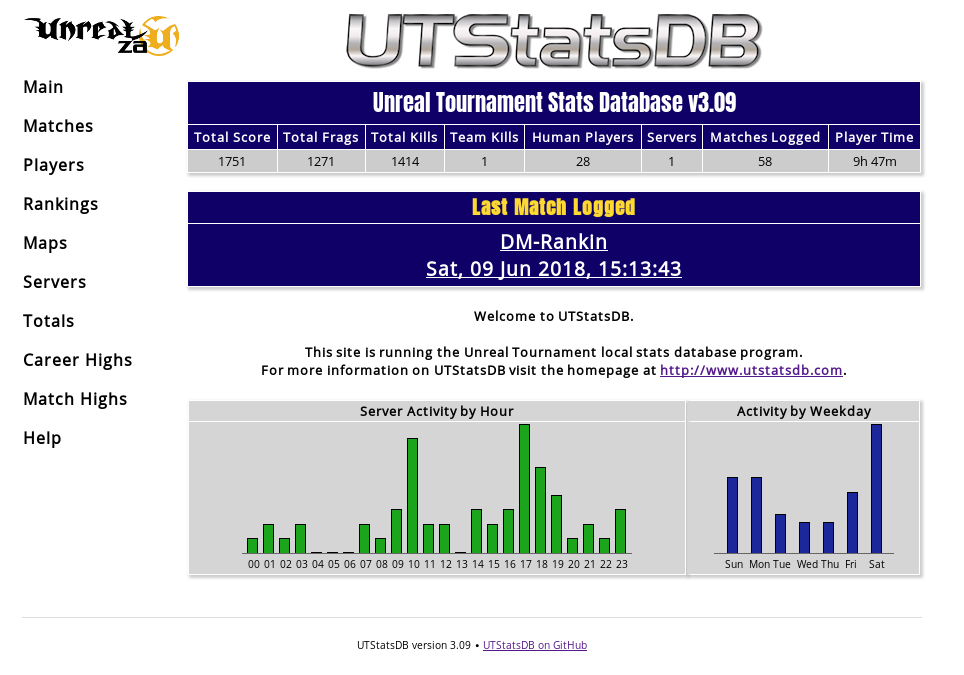
UTStatsDB is a player and match statistics system for Unreal Tournament 99, 2003, 2004 and 3, which parses match logs generated by each game (sometimes requiring additional server-side mutators), and makes stats for each game available through a website.

The stats are also aggregated by player, map and server, allowing you to browse and analyse quite a number of in-depth stats for each.

The project was developed and maintained by Patrick Contreras and Paul Gallier between 2002 and around 2009, where the original project seems to have been abandoned some time after the release of UT3. (addendum: by some coincidence, after 9 years of inactivity, the original author did create a release a few days after my revival/release) Locating downloads (the download page is/was not working) or the source (their SCM system seems to require auth or is simply gone) was quite troublesome.

Thankfully it was released under GPL v2, so I’ve taken it upon myself to be this project’s curator (addendum: since the original author also made a new release, I may now need to look into a rename or major version bump), and have since released two new versions, 3.08 and 3.09 which focus firstly on getting PHP support up to scratch so it runs without issue on PHP 7+, as well as implementing PHP’s PDO database abstraction layer for DB access, rather than using each of the supported DB drivers (MySQL, MSSQL, SQLite) directly.

In addition to many other bug fixes and issues, I’ve thus far revised the presentation significantly, provided Docker support, improved performance of several SQL operations by implementing caching and better queries, etc.

UTStatsDB can be found on GitHub, where the the latest release can also be downloaded.

A live example of UTStatsDB in action can be found at the UnrealZA stats site.

With all the talk of Unreal Tournament 4 possibly being cancelled one of these days, due to Epic’s runaway success with Fortnite, I’ve decided there’s really no reason to not be playing UT99.

Thus, we set about trying to run it on modern hardware, with a modern Linux installation.

As much as this is about setting things up on Linux, it’s also partially my own attempt at some knowledge preservation, as a lot of this stuff ends up being forgotten or lost over time (it’s been almost 20 years! a lot of the old sites and things you expect to find this info on simply do not exist anymore :()

This is part one of two, and will focus on installing and running the game using Wine.

arrow Continue Reading ...

I recently went through the process of reinstalling the media PC connected to my TV, which I use to run Kodi for movies and TV, and Steam in Big Picture mode, which allows me to stream Windows-only games from my desktop to the couch.

I thought it would be useful to describe my setup and the process to achieve it, in case anyone else is interested in creating their own custom Kodi/Debian/Steam builds.

arrow Continue Reading ...

Wow. I hadn’t been paying much attention to this, since it’s been a while since anything with the “Tribes” name on it was worth following. This really does look pretty awesome though! It should be out this year as well.

I really have to use this thing more often than once or twice a year :D. I’m just going to do a few posts on a couple of subjects just for personal lols.

Lots of Team Fortress 2 has been played. I thought since it went free, there’d be plenty of noobs to beat up. Sadly all the kids playing games these days are not noobs ;). I’m also really enjoying playing an online FPS on PC once more, still something I haven’t done to any degree since UT3 fizzled (did it ever really get going at all, though?).

The more I play however, the more I long for something like Unreal to return.

TF2 is great fun, but it all feels extremely luck and spam based. Pretty much every class with the exception of the Spy and Sniper can be played by running headlong into the fight with your finger glued to the trigger and hoping for the best.

As much as I noobed my way through UT for years, I find myself missing the “precision” elements of that sort of game. Carefully timing armour and pickup spawns, shock-comboing someone halfway across the map, the intensity of a close CTF match. Sure there are still plenty of Flak monkeys and rocket spam, but TF2 just feels pretty flat compared to all that.

They just don’t make them the way they used to :). Quake Live doesn’t count because it’s Quake and I suck at it. Looking forward to trying Rage though, and I hope the multiplayer (on PC) is not too full of novelties like vehicles and crazy weapons. I could really do with some old-fashioned DM!

This is just a small update on the status of OOE. As the SVN server previously hosting the OOE source died, and many people have been looking for the source, a Google Code project has been started to facilitate future development.

The source is available as both a regular download and via Subversion.

It’s unlikely I will be doing any development on the project myself, however contributors are welcome.

Hah. Only 3 months late.

Out of Eve has been fully updated to Quantum Rise spec, the promised journal feeds, API key security, and a number of other tweaks. OutofEve.com has been updated to the latest available version, and the source is available for download.

Please leave any feedback in the comments of this post. I’ll set up a proper OOE page on this site at some point, with download links and more detailed information.

As mentioned previously, I just wanted to outline a few plans for a new Out Of Eve version, mostly for my own reference, as I’m finding it much easier to work toward goals which are actually written down/typed up (lol?).

Obviously first order of business is Empyrean Age compatibility. A number of table and field names have changed and require some code updates. Lots of icons have been added and updated, so I would also like to make use of those. Unfortunately a number of images are actually missing in the EA icon dump (drones, rookie ships), so a simple drop-in replacement doesn’t works so well.

Another essential requirement, which should probably have been included in the original release, is encrypted API keys. My plan is to simply encrypt and decrypt these with a simple key file stored elsewhere in the filesystem - away from the usual configuration file, database and published www documents, so if any of that is compromised, without the key file, the API keys are useless to anyone snooping them. This also requires a method to automatically update existing unencrypted API keys.

Another handy feature would be the introduction of Atom feeds for market and journal transactions. My initial idea was an entry for each new transaction, however anyone doing a lot of trading would find their feed reader overloaded quite quickly. The obviously better solution is to just generate entries with all transactions since the last feed poll (taking into account API caching delays as well). I know I’d find this one particularly useful.

Actually that’s all :-). If all goes well, it should be releasable by the end of the weekend.

A long time ago, in a galaxy not far away, I created a very small application named SaveScreen. Today I’m rather pleased to release a much-improved SaveScreen 2.

A couple of anti-virus applications complained that the .dll file distributed with SaveScreen which enabled detecting when “Print Screen” was pressed, was a virus or malware of some sort, so even I was unable to use SaveScreen, which made my cry.

Finally fed up, I set out to resolve the situation by creating a brand new application which did not rely on random keyboard hooks and stuff. The result is SaveScreen 2.

In addition to no longer being flagged as a virus, SaveScreen 2 features direct ImageShack posting (complete with automatic forum code creation and thumbnail support), and FTP uploads of screenshots. Something which may be rather handy (just don’t take a screenshot of your bank statement then complain when the whole world is exposed to it - use with care). Also, it can save screenshots in per-application folders, making organisation somewhat neater.

Since the XBox Live “GamerCards” are so nicely exposed, there’s really no reason not to have a DynaBar plugin for it, now is there.

I’ve noticed a few GamerCards claiming to be in “userbar” format, however they do not follow userbar standards in layout, dimensions, or fonts. So, soon you too can have a lovely dynamic standards-compliant GamerScore userbar such as this:

Well, despite around 10 years of pure PlayStation fanboyism, I’ve caved in and decided to get an XBox 360. With the South African launch happening officially at midnight on Friday the 29th, I now find myself counting the hours, and thinking XBox and games every waking moment. I don’t know if it’s hype or something, but I can’t remember being this excited about a console before.

I shall be collecting my new toy from Look & Listen, first thing on Saturday morning, along with an extra wireless controller, Need for Speed: Most Wanted, Burnout Revenge (all included in a R4399 bundle), then I’ll be dashing off to BT Games to grab Dead Or Alive 4, and Project Gotham Racing 3 at somewhat lower prices than Look & Listen offer.

Looking forward to writing about my experiences with the 360, something different for a change. Only two sleeps left!

Guess it shouldn’t have taken so long for me to get around to doing this, but at least it’s done now.

Attached to this post you’ll find a zip file, containing a small example application which allows you to spawn PyODE physics-enabled cubes with the middle mouse button into a PyOgre world. You can then bounce and roll the cubes around by holding the left or right mouse buttons.

The code is fairly straight-forward, and I’ve included quite a number of comments. Should be easy enough to follow what’s going on if you’ve been through the PyOgre tutorials.

A note of performance and stability - you can safely spawn loads of cubes as long as there are not too many collisions going on at once (after around 50 cubes, things start to get really sluggish if there are too many inter-cube collisions going on). In practice though, I doubt you’d need that many collisions happening at any one time. Also, If you make a large pile of cubes, lift them all up, and let them fall down together, it seems to bomb out as there are too many collisions happening when they all land on top of eachother at once. I haven’t debugged this very much, so I’m not sure yet if it’s a ODE limitation, or something bad I’m doing in the code. If anyone works it out, I’d be interested to know.

Please don’t ask for advice on stuff like per-polygon collisions, terrain collision and the like, I have not really messed with this beyond the state of this example. Once you get the basics going after checking out the example, I’m sure a few questions shot off at the PyOgre Forums would turn up more useful results than asking me :).

Have fun ;).

Well, in the interests of Monster Hunt surviving a bit longer, I’m releasing the full UnrealScript source code.

Included is a basic license document, outlining in simple terms what you may and may not do. Basically, you may make any kind of MH mod or ‘sub-mod’, however you must give due credit for the original creation. Even if it’s very basic, please read it if you intend using it for creating a mod.

You’ll find the file at the end of this post… Have fun :)

MonsterHuntSource.zip

I was browsing around the BeyondUnreal Forums the other day, and came across an 11 page thread, with around 720 replies, about Monster Hunt. Interested to see what’s up, I checked the CSports rankings for Unreal Tournament, and was shocked to find MH is the #4 most played UT gametype in the world. Coming in after CTF, DM, and TDM.

Seems people have been making maps like nuts, there seem to be over 300 of them, there are a few mutators and mods available for it as well. I found there’s even a pretty large fansite, Planet Monster Hunt.

Not too bad for a mod I thought I had retired nearly four years ago ;).

My idea for implementing non-physics physics into my little game framework didn’t work out too well, so I gave in and took a look around for options.

It seems only ODE is available to Python, via PyODE. Not many [open source] physics engines seem to have Python bindings, which I find rather odd.

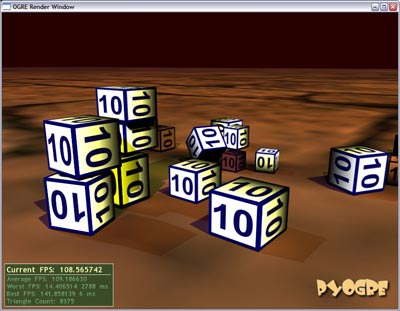
As it turns out, it isn’t actually all that of a mission to get ODE and Ogre working together, and the results I’ve got so far are quite acceptable. I can spawn loads of cubes (of varying sizes) and throw them around the scene and they bounce and jump around in a suitable fasion.

PyODE and PyOgre playing nicely

I haven’t tried with balls or polygon-accurate stuff yet, that’s next on the to-do list. I also intend writing a short how-to for PyODE and PyOgre integration at some point, as I was a little confused to start with, not knowing quite where or how to begin, and there is no PyODE/PyOgre example code floating around to reference.

EDIT: Example using PyODE and PyOgre now available

It seems as though the guys at work are seriously looking into the option of doing some game development next year some time, and they’ve been busy checking out various engines and frameworks to help with this. Despite being the only person at work who plays games seriously, and my history of developments on the Unreal engine, I haven’t really been included much with what’s going on.

However, since game development (of any kind) is the number one thing I’d like to be doing with my life (NOT point of sale systems!!), I’ve decided to involve myself anyway :D.

I have been playing around with a couple of game and physics engines (games being discussed are potentially vehicle-based), and Irrlicht particularly seems rather nice. Korpse however, suggested I take a look at Ogre. I was very pleasently surprised to find the PyOgre project, which exposes about everything Ogre can do, to Python (you don’t even need the Ogre SDK, it works completely on it’s own), and seems very well supported. I’m a lot more comfortable with Python than I am with C++ :).

The only down side, is that Ogre is not a complete game engine, but rather simply a graphics engine. Meaning, I’ll have to work out how to add sound, physics, advanced input options (Ogre does support keyboards at least), etc on my own. There are a lot of options available for all of those, so I’m not really worried about it at the moment.

I’ve begin putting together a bit of a basic framework for myself, trying to base how things work around how UnrealScript works and interacts with classes and objects. It’s working out pretty cool, thanks again to Python.

As a test project, I’ve decided to put together a sort of basic World War II flight sim. All you need really is a model, some terrain, and basic flight physics (which I plan on simulating without the use of a physics engine, in a similar fasion to how I did some stuff in Unreal Tournament [pre-Karma]).

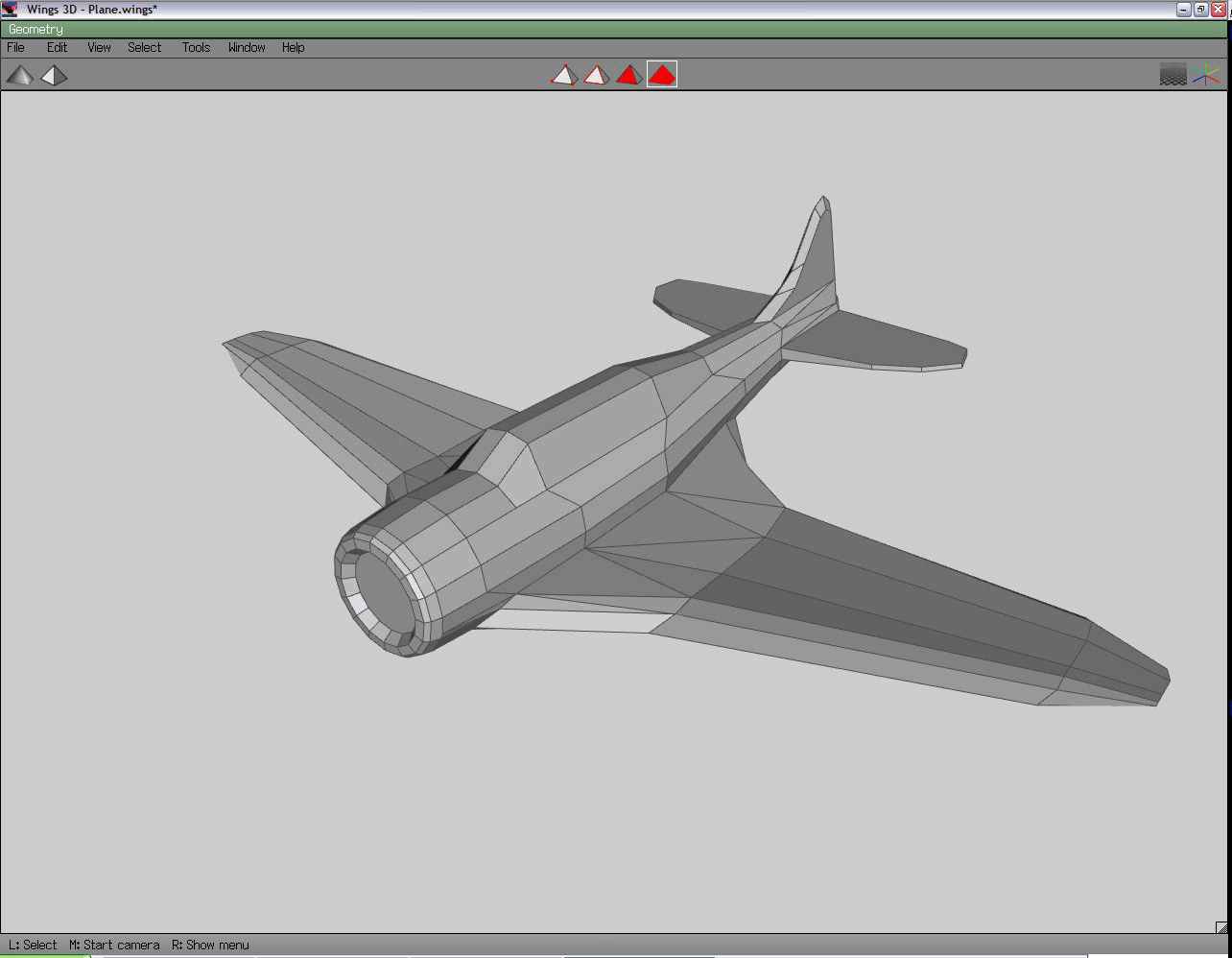
Since the scripting is going well, I decided to take a shot at a quick model. I came across Wings 3D – a simple “subdivision modeler”. Basically you start off with whatever primitive shape (cube, spheres, cylinder, etc) you think will suit what you’re going to build, and stretch and warp it into the final product. I’ve never modeled like this before, but it works surprisingly well.

After 2 hours work, I got the following result from a 16-sided cylinder:

There are quite a number of rather ugly polygons, but it was a learning experience :).

I just came across a post on Voodoo Extreme about the fact that IGN are offering fansite hosting. The commentary along with the post really made me think about the state of fansites in recent years.

They really *have* pretty much completely died off. The closest you’ll get to a fan site these days is something like the SGS or Prophecy forums. I see the Prophecy homepage is even a store-front now, with the forum coming across as an afterthought. Perhaps a little closer to the original fansite idea, you get places like BeyondUnreal and GameSpy’s various Planet* sites. However, these sites have taken themselves from traditional fansites, to giant networks, many of which focusing on some business model or another, rather than the game that got them going in the first place.

On the other hand, a site like UnrealZA is perhaps one of the few remaining dedicated fan sites around. Although, most members on the forums hardly play the game any more :), the idea behind the site and it’s operation has remained pretty much the same since Buccaneer founded it way back in 1998 (granted, a lot of sections and things have been ‘streamlined’ or removed completely due to lack of interest from maintainers and readers alike).

Sadly though, I have also noticed fewer and fewer visitors, and new community members, on the site. Perhaps this is why the bigger sites have reformed themselves from mere fansites like UZA, to the giant networks they are today. I’d really like to try some new stuff with UZA, which I believe could be rather successful (thinking the ’network’ approach of some sites), however on the other hand, I’m worried about losing UZA’s ‘identity’ and ’legacy’ which has been one of the cooler things about being involved with UZA. It really is a pretty unique place on the local gaming scene, I think.

But we’ll see what develops over the coming months.

I’ve had a couple of questions regarding my Battlefield 2 Stats in Python post, and how it may be possible to do the same in PHP, so I thought I’d add an update for that.

Simple PHP code for Battlefield 2 Stats retrieval:

    ini_set("user_agent","GameSpyHTTP/1.0");

    $info = "per*,cmb*,twsc,cpcp,cacp,dfcp,kila,heal,rviv,rsup,rpar,tgte,dkas,dsab,cdsc,rank,cmsc,kick,kill,deth,suic,ospm,klpm,klpr,dtpr,bksk,wdsk,bbrs,tcdr,ban,dtpm,lbtl,osaa,vrk,tsql,tsqm,tlwf,mvks,vmks,mvn*,vmr*,fkit,fmap,fveh,fwea,wtm-,wkl-,wdt-,wac-,wkd-,vtm-,vkl-,vdt-,vkd-,vkr-,atm-,awn-,alo-,abr-,ktm-,kkl-,kdt-,kkd-";

    $pid = '43595724';
    $data = file("http://bf2web.gamespy.com/ASP/getplayerinfo.aspx?pid=".$pid."&info=".$info);

    $stats = array_combine(explode("\t", $data[3]), explode("\t", $data[4]));

    printf("%s has %s kills and %s deaths and a score of %s", $stats['nick'], $stats['kill'], $stats['deth'], $stats['scor']);

Note that if you’re not using PHP5, you’ll need to add the following drop-in replacement for the “array_combine” function:

    function array_combine($keys, $vals) {
        $i = 0;
        foreach ($keys as $key) {
            $newarray[trim($key)] = trim($vals[$i++]);
        }
        return $newarray;
    }

It’s also important to note that while at the time of writing this, this method of retrieving stats works, EA, DICE and GameSpy are supposedly working on a new XML-based stats system for BF2.

Updated: Since this was written, some things changed with the stats system, and the GameSpy application requires you to pass a bunch of columns you want info for. This can help customise the data you get back, so you only request what you need. I’ve included all the columns in the $info variable, which you can customise. Make sure it contains only valid columns, or you won’t get any data back at all.

For info on what to do with the stats, and what all the columns etc. mean, check out the BF2 Technical Wiki.

Someone posted an image of somewhere they’re staying in “Qatar Doha” (no, I don’t know exactly where that is ;)) on the SGS Forums, mentioning how similar it looks to the Battlefield 2 map, Strike at Karkand.

I thought it might be cool to try to make the image look a bit more like the map, adjusting the colour balance, adding the orangey dusty air effect, etc. Further on, someone posted an image with some player characters and a jet overlayed, I though it was a pretty cool idea, so I whipped out Photoshop, my previously modified image, the official BF2 site (for screenshots of vehicles and characters), and got to work.

The end result is pretty cool I think :D. Click for full versions (original on the left, mine on the right):

Lost in time

Update; toned down the colours a bit, didn’t realise the monitor I did this on originally was so off :P.

A few weeks ago, the Serious Sam 2 demo was release, and my clan, the Avatars, and I were dying to try out the co-op, since we had played the previous game though together (although some shocking networking code made it near impossible), and were rather looking forward to SS2.

Unfortunately however, the demo’s internet play functionality was rather broken. After some digging on various forums looking for a solution, someone found a rather useful little utility - Hamachi.

Hamachi is basically a very simple VPN system, which behaves pretty much like an instant messaging client. When you install it, you’re run through a very informative little tutorial to get you started. During the process, you’re assigned an IP in the 5.5.x.x range - though I’m not entirely sure where the range starts or ends, we all got IPs like that - and a new Hamachi network connection is created under Windows. You may then join or create as many private or public networks as you like.

Members on the network can ping each other on their “Hamachi IPs”, they can browse shares, and copy files backwards and forwards (shares even end up showing up in your “My Network Places” eventually), send messages back and forth, etc. And of course in our case, it registers in games as a LAN connection, so you can easily play any multiplayer game with LAN support, without the need for the person hosting the game to mess with their firewalls, routers, port forwarding, etc.

There is a Linux binary available, however I couldn’t get this to work on my Debian Sid server, there were various tunneling problems, which are a bit beyond my networking skills to resolve.

In general though, the possibilities are pretty endless. Anything you can do an a LAN, you can securely and easily do with Hamachi, on a network spanning the world if you really wanted.

“Oops, I just printed my bank statement to Joe in Australia’s printer!”

Ever since installing BattleField 2, I’ve had a problem with taking screenshots. Basically, the game completely freezes up when I press whatever key is assigned to screen captures, and I need to reset my computer completely. Also, I seemed unable to use Fraps to make screen captures since the game seemed to be blocking all requests to whichever keys I assigned to Fraps’ capturing options.

I decided to rather just create my own utility. A simple application that hooks into the “Print Screen” key’s press, so when you press Print Screen, this app takes the image out of the clipboard, and will write it to a folder as a JPEG image. You can customise both the output location and the JPEG compression quality. The images are named after the current date and time.

It doesn’t work only for games, ANY time you press Print Screen, a screenshot will be saved. I think that could actually be pretty useful.

Yes, there are a million screen grabbers for Windows out there, but writing something yourself is both educational, and you know exactly what it’s doing. Also, I now have a single screenshot button for games, and everything else as well :D.

Note this may not work for all games, as some games tend to dump quite a mess to the clipboard when attempting a Print Screen.

This post also serves as a test for the attachment plugin for WordPress I recently installed ;).

Yes, so everyone’s obsessed with checking their BF2 stats these days ;).

Anyway, I wanted to give my Supybot IRC bot (“Nooblet” on Shadowfire) the ability to check my own and other people’s stats whenever they felt like it. I came up with something like this:

import urllib2
from string import split
from time import time

# the columns you want to request data for. comma-separated string.
info = 'per*,cmb*,twsc,cpcp,cacp,dfcp,kila,heal,rviv,rsup,rpar,tgte,dkas,dsab,cdsc,rank,cmsc,kick,kill,deth,suic,ospm,klpm,klpr,dtpr,bksk,wdsk,bbrs,tcdr,ban,dtpm,lbtl,osaa,vrk,tsql,tsqm,tlwf,mvks,vmks,mvn*,vmr*,fkit,fmap,fveh,fwea,wtm-,wkl-,wdt-,wac-,wkd-,vtm-,vkl-,vdt-,vkd-,vkr-,atm-,awn-,alo-,abr-,ktm-,kkl-,kdt-,kkd-'

# this is my BF2 ID. You can also query the stats server with "nick" rather than "pid", but I've had problems with some characters
pid = '43595724'

opener = urllib2.build_opener()
opener.addheaders = [('User-agent', 'GameSpyHTTP/1.0')]  # otherwise GameSpy's servers will block your request
webData = opener.open('http://bf2web.gamespy.com/ASP/getplayerinfo.aspx?pid=%s&info=%s&nocache=%s'%(pid,info,round(time()))).read()

statsData = split(webData, "\n")

cols = split(statsData[3], "\t")
data = split(statsData[4], "\t")

stats = dict(zip(cols, data))

# you now have a nice dictionary with a few hundred bits of stats data.
print "%s has %s kills and %s deaths and a score of %s" % (stats['nick'],stats['kill'],stats['deth'],stats['scor'])

Thanks to korpse and mithrandi for showing me the “zip” function. It takes the list from the first parameter, and uses those values as keys in a dictionary, the values from the second parameter are then used as values in that dictionary. I was using map(None, keyList, valueList), but zip seems cleaner.

Anyway, if you’re looking for more info on stats querying, try the BF2 Technical Info wiki, or check out SaladFork’s Guide to Creating a BF2 Stat Signature - although it’s in PHP, he does give a nice list of column names and their meanings, you can also grab lists of ranks, weapons, vehicles, etc.

Update: Also see: Battlefield Stats in PHP

Updated: Since this was written, some things changed with the stats system, and the GameSpy application requires you to pass a bunch of columns you want info for. This can help customise the data you get back, so you only request what you need. I’ve included all the columns in the info variable, which you can customise. Make sure it contains only valid columns, or you won’t get any data back at all.

As above, for info on what all the columns etc. mean, check out the BF2 Technical Wiki.

I sat down this afternoon and had a bit of a play with Gran Turismo 4’s Photo Tour option within GT mode. I must admit I’m rather impressed, and although it’s seemingly boring, it turned out to be a rather entertaining exersize.

It basically presents you with a couple of venues from around the world

  • Venice, Tokyo, New York, the Grand Canyon, etc, which are pretty much static scenes, with pre-defined car and camera ‘zones’ within which you may arrange things to you liking. You control the vehicle location, rotation and wheel rotation, and camera location, height, tilt, zoom, focus, etc. After you’ve got your scene arranged just right, you can fiddle with things like colour balance, saturation, etc to get the scene just right.

You then get to take your photo in a lovely high resolution, and save it to a USB flash disk! WOW! Someone finally found something useful to do with the PlayStation 2’s USB ports, aside from whacky controller contraptions. Anyway, once saved, you pop off to your nearest PC and offload your pics (which are saved in JPG format).

A few of my results (I only have cheap cars in my garage at the moment);

Images lost in time

So ja, it’s been reported that the games SWAT 4 (via the latest patch) and the latest Splinter Cell games both have ’live’ advertising, which download as you play and display stuff, basically no better than banners, on posters, vending machines, billboards, etc. within the games.

Both of these games seem to have been ’enhanced’ by what seems to be a recently launched ‘service’, Massive Incorporated, specifically set up to place advertising within games.

Personally, I have a few problems with this. Firstly, I’ve already payed around R400 for my game. Now as I see it, things like advertising are usuallly used to subsidise either free services (eg: banner ads on many websites), or relatively cheap services (eg: ads on TV and radio). Now why the hell do publishers feel the need to milk even MORE money beyond the R400 a copy they are selling?

Secondly, there is NO opt-out. If you want to play the R400 game you just bought, you have to agree with the fact that you will be downloading these ads and wasting bandwidth on every map/level change, that they will be defacing your game, and you will be sending the advertisers ‘usage statistics’ - how long you looked at each ad, what angle you looked at it from, how far away you were from it, etc. As I read elsewhere (forgotten the URL at the moment), it’s pretty scary that this is the ‘first generation’ of this technology - I can only imagine the kinds of things they’ll track about your playing habbits in the future.

And finally, it’s just plain intrusive. I like seeing often humerous made-up posters where they’re needed - which is normally seldom in most games. I don’t want to see darn Coke ads in my games. Also, I’m sure publishers and advertisers will start pushing developers to include even more and more advertising billboards/posters/vending machines/etc in their levels, until one day you’re sneaking/running/driving/strolling/handing/rolling around some kind of psycho colourful flashing whacked hall of nothing but lame-ass banners and shit. Piss off with that stuff, please.

Aaaanyway, you may have guessed this idea doesn’t appeal to me at all. Unfortunately once the trend is started and the standards are set by a few games, things will only go downhill.

What’s also scary is that both SWAT and Splinter Cell are Unreal engine games :(. At the moment though, neither Epic or Midway have signed on with Massive Inc. it seems.

titleBattlefield 2

date 15 Jun 2005

MMMMMMMMM

This game (demo at the moment) is really sucking up all my evenings :D. The gameplay is absolutely brilliant. The whole Squad story is just ownage when playing with a decent bunch of players. Just a pity squads can only be 6 people big.

I can actually fly planes too. Managed to shoot down a helicopter and a plane last night (though the plane kill took about 5 minutes of frantic flying from my victim). Though there’s always someone else behind me waiting for me to fly straight for a half second too long :(.

If you like team games, with a rather unrealistic, yet somehow realistic feel, get this when it comes out on the 28th (South African release apparently).

titleEVE Online

date 14 Mar 2005

Well I’m back from JHB :P.

I just spent my entire weekend playing EVE Online - a MMORPG type affair based in space - if you’ve played Microsoft’s Freelancer, you’ll have an idea of what this game’s about. Only difference is that EVE is a million times bigger, has thousands of players online at any given point (all in a single, living universe), is nowhere near as linear or dull, and the graphics will blow you away.

The best way I can think of for describing this game would be “OMG”. It is absolutely massive. Over the entire weekend I trek’ed around maybe 10-15 solar systems at the most, yet there are hundreds available. Every time I arrive to dock at a station, or pass by a stargate (transport between systems) there are ships I have never seen before. There are NPC-based missions galore, there are hundreds of player-run corporations, doing mining, production, peace-keeping, bounty hunting, and who knows what else.

This is absolutely THE most open-ended game I’ve ever laid eyes on… You can do absolutely anything. For example, you could set yourself up with offices and a production facility in a station, then go out and mine for ore and stuff, bring that back, refine it, buy some blueprints for a ship, build the ship with the refined ore, and sell the ships to other players. You could even buy ore from other players who do the mining for you, or buy new blueprints from traders bringing them from systems 20 jumps away.

It’s quite amazing… Get someone with a full subscription to give you a 14-day trial, download the client for free, and give it a bash :).

http://www.eve-online.com/

How kewlies is that - UnWheel has taken it’s rightful place as the #1 voted driving mod of 2004 (across all games supported by modDB). Hehehehe.

Might as well list all UnWheel’s achievements to date for the fun of it ;)

Make Something Unreal Contest - Phase 2 (UT2003):

  • 1st place, Best Non-FPS Mod
  • 1st place, Best Vehicle
  • 1st place, Best use of Karma Physics

Make Something Unreal Contest - Phase 3 (UT2004):

  • 3rd place, Best Non-FPS Mod
  • 2nd place, Best Vehicle
  • 1st place, Best use of Karma Physics

Make Something Unreal Contest - Phase 4:

  • 7th place, Best Non-FPS Mod (can’t win em all ;-))

Make Something Unreal Contest - Grand Finals:

  • Finalist (results pending)

Other accolades and awards:

  • Bundled as one of 11 mods in the retail Unreal Tournament 2004: Editor’s Choice Edition.
  • 1st place in ModDB’s Mod of the Year - Driving category.
  • Awarded PC Zone UK’s Essential Choice, and featured on cover DVD twice (Sept + Oct 2004).
  • Featured Mod on FilePlanet’s homepage (EC/MSU Phase 4 version).
  • Featured on several magazines’ cover disks throughout the world, including UK PC Gamer (Dec 2004).

Not too shabby, hey?